Week 6 This week in PR pubs we had a guest speaker, Tiffany Lea. Tiffany is a designer for OU Continue Reading
This week in class we were assigned to write 2 media advisories and 2 media pitches. I read the online lectures and formatting about media advisories and media pitches and was ready to jump in. Writing the media advisories wasn’t too bad I just struggl…
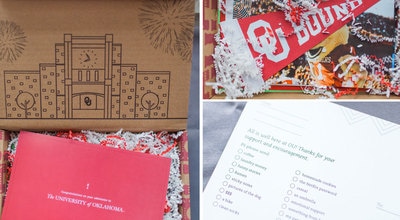 Image of OU acceptance box Tiffany (guest speaker) worked on. Image from: http://okcaddyawards.com/wp-content/themes/addys-theme/dist/images/peoples-choice-awards/xou-admissions-and-recruitment.jpg.pagespeed.ic.fJ4imtEs8F.jpg
This Tuesday in Croom’s class we began to tackle another Adobe application which was Photoshop. I watched some tutorials on Lynda on the basic tools and how-to use Photoshop. Some of the differences between Adobe In Design and Adobe Photoshop threw me off such as how there are layers on the canvas in photoshop but there are no layers in In Design. With any new application comes uneasiness and uncertainty but by the end of class, Photoshop did not seem like such a foreign application to me. On Thursday we had a guest speaker, and her name was Tiffany. She spoke to us about the essential elements to think about when designing projects in Photoshop as well as where her inspirations came from when designing for OU Admissions. Her take on typography and how important leading was when designing something to be printed showed me that little things could make a huge difference in a design’s look. Also, I found it interesting how she looked at big corporations such as Stitch Fix for inspiration and not just universities so that OU would stand out and be different from other colleges. Having her come speak was beneficial and helpful because it helped me realize some things I needed to take into account when starting our photoshop design project next week. I am excited to see if I can create pieces that appeal to a particular age group/public and keep all design elements in mind as well within the next few classes to come.
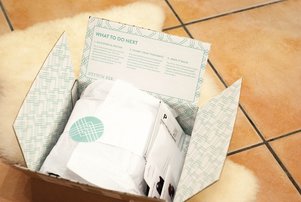
Some of the inspiration for the admissions box pictured above came from this Stitch Fix box. Image from: http://www.thedustyrosestyle.com/wp-content/uploads/2015/01/DSC_0798.jpg
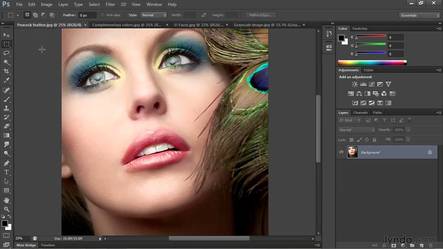
PR Pubs is picking up the pace and really testing our digital and creative skills. This week we dipped our toes in the water and tested ourselves in Photoshop. Yes, the miracle software. The one that makes everyone look gorgeous and not real. But we aren’t touching up model photos or anything… we are designing from scratch. Our class is still beginning to learn the lay of the land but we have been watching a lot of videos before creating our own direct mailer. Surprise that’s what is to come in my PR pubs class. Next week we begin to design our own personalized direct mailer for the residential colleges opening on campus.
|

|
Today, we had a speaker from the admissions and recruitment office at OU; her name was Tiffany. Tiffany enlightened us on what really goes on being the advertising and media at OU. She described their software they use for emailing, texting and mailing out information. They target their markets specifically so they don’t waste OU funds on pointless postcards and to get the most out of their audience. She explained how OU personalized each postcard once so it felt unique to the new recruit. Tiffany not only spoke about the design aspect but also gave us future tips if we are interested in going into design or even just applying for an internship at OU. These were the five tips or ideas I took away from Tiffany’s presentation.
- Tiffany prefers her interns to have very minimal design experience so she can truly train and influence them. This was interesting to me because as I have been applying for internships, I have been rejected because I do not have 3-4 years of experience. Well what is the point of an internship?? If I am applying of course I don’t have experience. It’s a tough world out there guys!!
- Tiffany gets bored always creating a red postcard or using the same colors over and over again. She does this because this is the OU brand and changing it would mean the audience would not connect their advertising with OU. Would Apple change their logo just because they got bored always slapping an apple on their products? Nope!
- Tiffany starting out was not perfect at designing. She passed around a pamphlet that she created when first starting out that she said was awful and then showed us one she made three years later. Her design skills advanced through working at her job. This displays how you are constantly growing and learning in a design job. The game is always updating and changing.
- Tiffany has created many protocols for her staff and herself when designing for OU. I noticed in a lot of her slides there were always three points or strategies her office uses for everything. Everything goes through a process and a heavy editing cycle.
- Lastly, Tiffany’s presentation overall was not the most exciting, but you could tell she was passionate about OU, her job and trying to reach our class positively about the admissions and recruitment office. She really knew her stuff.
Overall, Tiffany enlightened our class more about what goes on being closed doors at OU and about the design background OU has. I am looking forward to working with Photoshop next week in class and listening to our next guest speaker. Stay tuned to preview my Photoshop work!
P:S: Tiffany described the new admissions box when you get accepted to OU. Apparently it’s a cute box not a folder like I got four years ago. How do I get my hands on one of those?
Always with Love,
Heather Gilbert
This week in Public Relations Publications, we started the week off by learning about how to navigate through photoshop. I barely jut learned how to use InDesign, so when I heard we were learning how to use a whole other software I was a little nervous. I know it is necessary to learn multiple ways […]
This week we watched Photoshop tutorial videos on Lynda. I’ve never really used Lynda until this semester and I’ve learned to really like it. The instructions are clear and I appreciate that there is a transcript to go along with the videos. Here are some new things I learned about Photoshop:
1. If you simply press “B” on the keyboard while using Photoshop, the brush tool becomes selected.
2. I liked the analogy that the layers on Photoshop are similar to a stack of papers. You can only see the top paper (or layer), but there can still be other papers (or layers) beneath.
3. I finally learned what the lasso tool does!
1. If you simply press “B” on the keyboard while using Photoshop, the brush tool becomes selected.
2. I liked the analogy that the layers on Photoshop are similar to a stack of papers. You can only see the top paper (or layer), but there can still be other papers (or layers) beneath.
3. I finally learned what the lasso tool does!
On Thursday, Tiffany Haendel from OU’s Recruitment Services lectured our class. She was really insightful. Here are some of her tips and pointers that stood out to me:
1. Utilizing leading with a smaller font is more easily readable than using less leading with a larger font. The leading allows areas of lots of text to not look as cluttered.
2. OU now sends an acceptance BOX (instead of just an envelope) to admitted students. This is a way to make the recruitment experience more exciting and personable.
3. The point of sending mass communication emails, text messages, postcards and other mailed items is to communicate a call to action. Printing is especially expensive, so if a piece of mail does not serve a purpose or encompass a call to action, it could possibly be a waste of money.
These are some of the biggest takeaways I got from Tiffany’s lecture. Thank you for visiting us, Tiffany! You were very insightful.
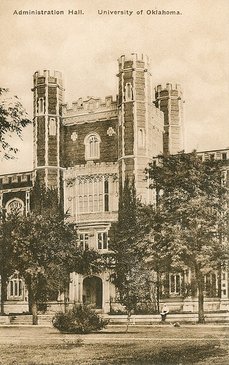
This old image on this University of Oklahoma postcard makes me think how far we have come with technology and graphic design. (Photo from The Postman Loves Me)
And the adventure continues, on to the next adobe suite application to master (by master I mean attempt to act like I understand what is going on for a few weeks and then move on)… More
Photo from PexelsLast week in public relations publications, we finished our letterhead based on our business card. This wrapped up our section on InDesign. Now, we are transitioning into Photoshop.Tuesday’s class was about learning the basics from Lin…
Photo from PexelsLast week in public relations publications, we finished our letterhead based on our business card. This wrapped up our section on InDesign. Now, we are transitioning into Photoshop.Tuesday’s class was about learning the basics from Lin…

This week we began learning about media advisories and media pitches. The goal for both of these pieces are to communicate with journalists about events and organizations that are happening and encouraging them to write a story about the topic.
Before this unit I didn’t know how to write an advisory or a pitch. I knew what they were but didn’t have any experience with them. It’s really interesting to learn the most effective ways to communicate with journalists to encourage them to write a story about the event or organization.
I would like to learn more about how journalists use this information to write stories and what else journalists would like to see in the advisory or pitch and topics that they wouldn’t ever want to cover personally or things they are interested in.
I already knew that becoming a public relations professional would mean communicating with journalists but I didn’t realize how many different tools were used to communicate the message to them. Pitches and advisories are both very effective tools used for different things.
This skill set will help me in my career because it will help me to communicate better with journalists which will then help get the word out more about my organization or event. Getting journalists interested in something that I’m doing will get the public more interested as well and will overall help my company.
