Graphic Design 

Posted by & filed under JMC 3343-002.

Picture

Graphic design is a great thing. It allows us to create unique advertisements, fun signs and everything in between. We see graphic design in almost every aspect of our world today and it is so important. However, unless you have had at least 6 months of experience, it seems impossible. The amount of tools, techniques, and hidden tricks that are used when creating anything graphic design is crazy to say the least.  
My first time working with graphic design gave me slight anxiety and a major headache. During our entire lesson I felt like I was one step behind and constantly trying to catch up. Everything my professor said seemed like a foreign language, and I’m sure I kept a confused look on my face for the entire hour. During my public relation publications class, our assignment was simple; take an image, break it down, and construct a replicate version. This seems like a piece of cake, until you actually try it. Very basic graphic design pieces begin with just plain rectangles and columns. An example of this is placed directly to the right. The rectangles are moved, resized, and colored to make each design unique to fit the client’s expectations. Titles, images, and other information is added to give the design character and create something truly original. There are so many small details that can be added to make each piece perfect. Font sizes and styles are two that can impact the overall quality of the design. When choosing font styles, always be sure that is it readable and that it all matches. When choosing font sizes, make sure the title is the largest piece and the subtitle, or following information, is the second largest. If the design contains any type of quote, putting it in a different size font, with a skinnier or bolder style will allow it to stand out and create some dimension on the page. All of these aspects are some that make graphic design so incredible, as well as difficult. 
I am eager to gain more knowledge and experience in the graphic design world. Clearly I am not a professional, but I can learn. In fact, I’ve only been in class for two days and I have already come so far. Graphic design is important, and it is such an avid tool in public relations. Having the skills to create an idea and design it to become something extravagant is something that I am confident in accomplishing, even though it is challenging.  

More examples of awesome graphic design pieces are in the link below. 
​

​


GEtting into design

Posted by & filed under JMC 3343-002.

 toBefore beginning this course I was pretty nervous about what to expect because it had been a long time since I had worked with any design software. Once we got into InDesign on Tuesday it felt kinda like riding bike (not that I would know because I can’t) I just picked up where I left off. I always loved designing things for the couple years that I did and I had really missed it. Recreating the annual report cover was a little challenging at first but once I remembered all the tools and what to do with them it got a little bit easier. Even though this piece was already designed and I just recreated it, the process that goes into designing something is a really fun experience. There’s so many different things that you can do and once it all comes together it feels like magic in a way because in the beginning I never thought that I’d get there.
Copying the candy newsletter on Thursday was a lot of fun for me because I love spacing. Some people hate it and aren’t very good at it but I like to think that I’m pretty good at it. Putting together all the different pieces is cool to see it all come together. I know that I still have a lot to learn but I’m really excited to keep learning and to get better. InDesign is challenging and kind of scary but I’m excited to continue learning and working with it. 

Indesign

Posted by & filed under JMC 3343-002.

​Wikipedia defined Adobe InDesign as publishing software produced by Adobe systems that can create works such as posters, flyers, brochures, magazines, newspapers, books, etc. Well… let me just say trying to figure out InDesign in class was the most rewarding and stressful experience I have had all week. When I say rewarding I mean I am actually proud that I learned how to make a rectangle and fill it in. I basically am an InDesign pro now…NOT! Let me just visually describe the emotions going on all around me while trying to follow our teacher in creating a freaking rectangle.

​Brittany on my right got so lost and stressed with keeping up that she actually raised her hand and asked where the desktop was. This describes her InDesign experience. 
​Rachel on my left was sitting there smug acting like she knew everything but really it was the calm before the storm. At the end she realized she missed making a sun and coloring a rectangle. Things clearly were moving fast!
09ca24e8538ab415802c8ab9270484cae6f4cc9e
imgres_2.jpg

               Before

                  After

​Sierra next to Rachel was absolutely hilarious. All you could hear was huffing and puffing before she blurted out that she never wanted to do this again. Sadly she has to compete a full semester of working with this lovely software. 
imgres_3.jpg
url.jpg

​As for me, I couldn’t really find a specific meme to describe my emotions but this will work! I had InDesign in the bag. Okay not really but I’d like to think I managed pretty well. I enjoyed learning how to use the software and am so sorry that unfortunately I think our teacher was running to the bar after teaching our class. We were so dysfunctional and had the silliest of questions but what are you going to do when messing with a foreign software! 

Once we returned to class Thursday, after getting a day to recover from the brain overload of InDesign, I think we handled practicing making a Newsletter pretty well. Thursday’s class was very much individual playing around on our own with the software and making our own minor mistakes. But don’t worry there were still mental meltdowns from Brittany, huffing and puffing from Sierra and Rachel and I dying laughing at everyone’s frustrations. I think this class is going to be enjoyable to say the least. If anything we are going to walk away with InDesign experience under our belt and knowing for a fact we chose right when not majoring in graphic design.
 
Stay tuned for more PR Pubs blogs and keep up to date with what we are doing in class by following my website!
 
Always with Love,
                  Heather Gilbert 

The Struggles of Learning Adobe In Design

Posted by & filed under JMC 3343-002.

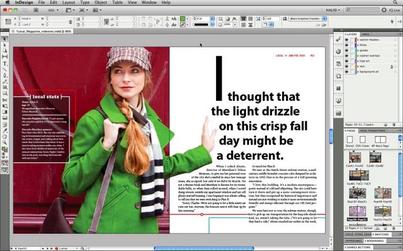
PictureAn example of what you can do in Adobe In Design. From: http://getintopc.com/softwares/graphic-design/adobe-indesign-cc-9-2-free-download/

This past week was exciting yet overwhelming at the same time. On Tuesday, Croom told us step by step how to recreate a design using Adobe In Design. We had a crash course in everything Adobe In Design in the span of a single class. Adobe In Design was confusing, to say the least, and the last time I ever used an Adobe Program was middle school. It was a reawakening for sure, but I really enjoyed it. There were so many tools to pick from, and I forgot I had to keep choosing the selector tool after finishing with a particular tool, so I was a little slow at the start. I was a deer in headlights for the majority of the class, but all in all my finished design looked pretty similar to what I was supposed to be mimicking. I left class feeling proud of myself for pushing through but mentally I was exhausted and relieved that was my last class of the day. 

On Thursday I came back hoping the day would be a little easier. Thankfully, it was and on the agenda for the day was to learn to work with columns in Adobe In Design. Croom showed us on the big screen how columns worked and how to create a layout for a newsletter or something similar to that. Then for the remainder of class, I was supposed to mimic a newsletter design given to me. There was a guide to what type of font to use and what size font but the rest was up to us. Thursday went by much smoother since I had finally begun to grasp how to use the Adobe program. Within 30 minutes my design was coming together and looking like it belonged with the rest of the newsletter. I had a few hiccups with how to properly align everything, but by the end of class, I finally started feeling comfortable with Adobe In Design. Croom instructed us at the end of class with some homework for the upcoming weekend. First, find a brand or company and do some research on it. Second, create a Pinterest board for competitor analysis and then a mood board for the brand/company. This information is going to be used for our first ever solo design project, creating a business card. I am excited to jump in next week on my own and see if I can create a business card worth using!
Till next week, 
Amanda 


Picture
A photo of me from middle school to help you understand how long ago I used Adobe until this past week. (lol)

Writing effectively

Posted by & filed under JMC 3343-002.

Writing with clarity means that the meaning of the sentence is clear to the reader and there is no confusion and the sentence is arranged logically.
Bad: She drove back to Tulsa in her car from Norman.
Good: She drove back to Tulsa from Norman in her car. 
Reducing clutter means there are no unnecessary words or phrases in the sentences. 
Bad: All four of the students turned in their papers late.
Good: All of the students turned in their papers late.
Sentence variety means the sentence isn’t monotonous and using a variety of sentence structure. 
Bad: Dr. Thompson will sit on the board of directors for American Airlines. The professor is a former American Airlines employee.
Good: Dr. Thompson, a former American Airlines employee, will sit on the company’s board of directors. 
Sentence emphasis means stressing certain words or phrases based on the importance of them.
Bad: Attorney General Michael Thompson said the serial killer was apprehended after a long police chase Tuesday night.
Good: The serial killer was apprehended after a police chase Tuesday night, the attorney general said. 

follow the leader

Posted by & filed under JMC 3343-002.

Adobe InDesign. What a simple name for such a complicated program. InDesign is undoubtedly useful for web designers, but certainly difficult for beginners. From figuring out how to change the background color, to realizing a window and frame aren’t th…

Writing Effectively

Posted by & filed under JMC 3343-002.

Writing with Clarity

Poor: The ring was found upon a counter with a diamond missing. 

Better: The ring with a diamond missing was found upon the counter.

​Reducing Clutter

Poor: Nobody in the entire class knew how to do simple algebra.

Better: No one in the class knew how to do algebra.

Sentence variety

Poor: The teacher was very lonely. She had no friends.

Better:  Since, the teacher had no friends she was lonely.

Sentence emphasis 

Poor: Rosie Farley spoke to 1,000 students and gave the valedictorian speech at graduation.

Better: At graduation, Rosie Farley gave the valedictorian speech. 

Dive (In) to (Design)

Posted by & filed under JMC 3343-002.

PictureThe Adobe InDesign logo. (Image from LogoGulf)

This week we learned the basics of using Adobe InDesign. On Tuesday, we mimicked Croom’s actions as we created an annual report cover. Croom walked us through the steps and we did our best to keep up. I’m not going to lie, this was an overwhelming class period. Every student had about 30 questions (including myself), but by the end, the room was silent as we became more confident in our abilities. Also, my version looked very similar to the original when I finished up. So, yay!

On Thursday, we learned how to create columns (or, newspaper style documents) with InDesign. Croom showed us the basics of column design at the beginning of class and then we were assigned to copy a preexisting document on our own.

Croom advised us that the best way to begin a layout is to first create placeholders for the content – which can include headlines, subtitles, bylines, photos, captions and more. After you figure out where the placeholders work best, you can fill in your content. 

I have caught on to the basics of InDesign faster than I anticipated. I thought Photoshop had my heart, but the tables might be turning!


Picture
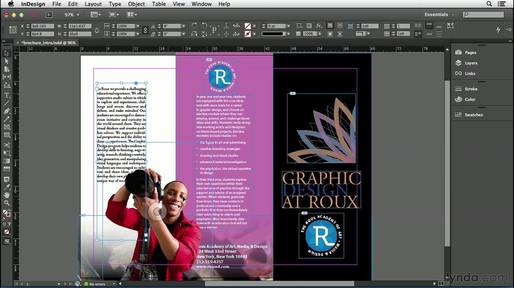
This screenshot of an InDesign project is a good example of how column design can be utilized to create a brochure. (Image from YouTube)

Writing Effectively 

Posted by & filed under JMC 3343-002.

There are many different forms and styles of writing. Some people may feel like less is more, while others say that detail is everything. For the majority of the time, it is best to keep writing simple and clean. Below are some examples that give a better understanding of effective writing. 

Writing with clarity:
Poor Example: We looked for the tools on the floor in the shop and we couldn’t find them. 
Better Example: We looked for the tools on the shop floor and could not find them. 

Reducing Clutter
Poor Example: Due to the fact that I have a test tomorrow, I will make sure that I study and I will also make sure that I complete all of my homework assignments tonight. 
Better Example: Because I have a test tomorrow, I will study and complete my homework assignments tonight. 

Sentence Variety
Poor Example: My mother is a teacher at an elementary school. Last year, she won the teacher of the year award. We were very proud. 
Better Example: We were very proud of my mother, an elementary school teacher, for winning the teacher of the year award last year. 

Sentence Emphasis:
Poor Example: The police officer said that the car crash was very serious and the driver is lucky to be alive
Better Example: The driver is lucky to be alive after a very serious car crash, the police officer said. 

The Ins and Outs of Typography 

Posted by & filed under JMC 3343-002.

My second week in class was was exciting. We learned about basic graphic design elements on Tuesday. I enjoyed learning the basic elements that would be included in many of our projects throughout the rest of the semester. I never knew there was so many things to consider when doing graphic design. I think learning about the basics will help me keep in mind what to do when designing. 

On Thursday Croom taught us the ins and outs of typographty. We learned how choosing the right font can effect the mood and overall goal of a graphic design piece. Learning about the history of typography was fascinating. Learning all the key terms that go with typography I think will be helpful when considering what font to use and how to properly space words/letters. At the end of class we played different typography games. These games were fun and helped me improve my attention to detail and the difference between serif and sans serif. This week interesting and I think will be very helpful for my future designs!

Picture
image from https://www.instagram.com/p/xp1wn9BR4l/