Card Me! Capturing the Carnival Cruise Lines Aesthetic

Posted by & filed under JMC 3343-002.

    I had a doozy of a week. Illness forced me to miss Tuesday’s class, but I still have plenty to talk about!
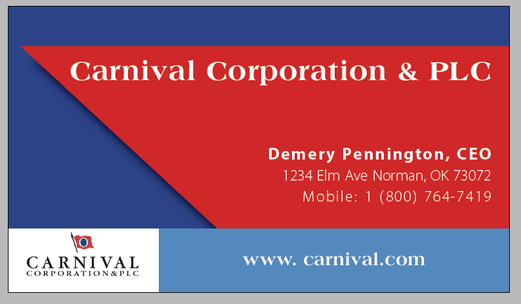
   This round of PR Publications left me with a mock business card for my graphic design portfolio.
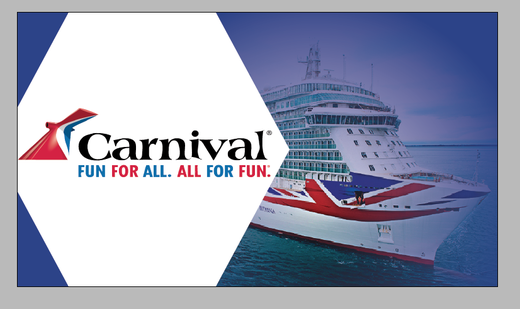
    ​I clearly designed for Carnival Cruise Lines and scouted an employee whose name and title would look suited to the card. I started with a shape to keep the theme simple, since I didn’t think minimalism was the right aesthetic for this company. After that, I played with colors and opacity to make the overall effect seem fun yet professional.
   Carnival Cruise Lines has a specific font on its branded materials, so I used the What The Font tool on MyFonts.com to identify it. After that, it was as easy as looking up the suggested fonts and loading the one I liked best into InDesign. (If you’re curious, I used Tempo Std. Regular.)
     I also attempted to mimic the classic Carnival Cruise Lines red as it appears online. 
​    Since I was a bit rushed for time, I had to do it by hand instead of placing a picture of the company’s logo into my work and using a color picking tool to copy it more precisely, but I may go back and make that change for the sake of accuracy.
    In any case, this was an incredibly fun and useful mini project. I feel more comfortable with InDesign than I did last week, and I’m positive that trend will continue.
Creating your Business Card

Posted by & filed under JMC 3343-002.

​Okay you guys! You have just started building your brand or company. You have a name, email, phone number and address or location you can be reached at. What do you need next? A BUSINESS CARD!!! Everyone knows that a beginner or established individual, company, organization or business has a business card. When thinking about how to design this you have to think of the mood you are going for. Also, if you work for a major corporation you most likely will need to match your logo and color scheme to there’s. There are so many websites out there that can create a personalized business card for you but what’s the fun in that. Why not design it yourself?
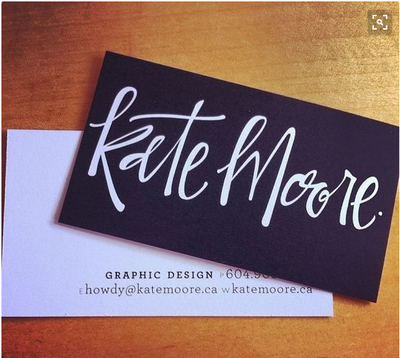
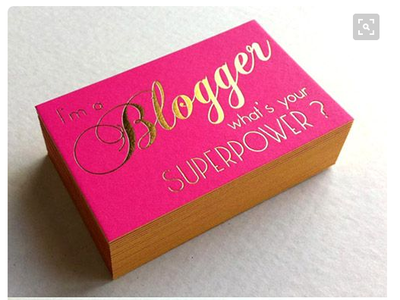
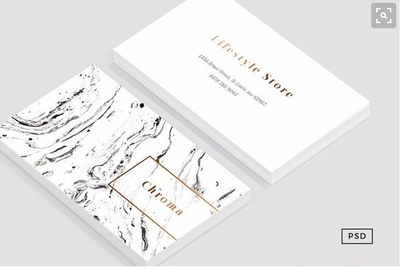
So I say why not design it yourself and you already know I am referring to another experience in…InDesign. This time around I was doing steps quicker, creating rough drafts faster and designing at now a second grade level. Quite proud I must say. I may have even called my mom after class and begged to make her business card. Sadly, she told me to leave it to the professionals. Although InDesign and I have our differences about every Tuesday/Thursday in PR Pubs I am still enjoying learning the ropes and bringing out my creative side. If anyone is like me they are better verbally expressing the design they want to apply than doing it on the computer practicing your graphic design skills. Here are some awesome business cards that creatively spoke to me.
screen-shot-2017-02-09-at-10-00-23-pm.pn
screen-shot-2017-02-09-at-10-03-49-pm.pn
screen-shot-2017-02-09-at-10-05-21-pm.pn

Class Recap: Basically you all know I made a business card in class this week. I created one for my roommate’s sister who works as a real estate agent at Keller Williams. Before beginning designing my teacher instructed us to make two Pinterest boards. One was a competitive analysis board and the other a mood board. We had to pin business cards, color schemes and ideas competitors were doing to get ideas of how we wanted to improve or build our own design. We also had to add photos to a mood board. Which is exactly what you’re thinking… the mood of the business card. My board included red, white and gray color schemes and cursive fonts I was intrigued with using. The research step was not my finest hour because I kept jumping to designing without completing the research first. Needless to say my teacher was not amused with my procrastination of researching and skipping this step. I just got so excited too test my design skills.
 
Well that’s all for this week guys! Continue reading throughout the semester to check out what is going on in PR Pubs!
 
Always with Love,
            Heather Gilbert

Sometimes Simplicity is a Good Thing

Posted by & filed under JMC 3343-002.

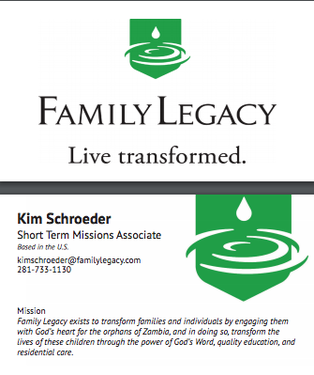
PictureThe business card I designed in class.

As I mentioned in my blog post from last week this week in class, our assignment was to design a business card.  Before class, we had to pick a brand and do some research on it. I chose the nonprofit Family Legacy which helps the orphans of Zambia learn about the Lord and equip them with a quality education. I knew Family Legacy was the brand I wanted my business card to be designed after because I have worked closely with them in the past and I have been personally impacted by this organization as I have mentioned in a previous blog post.
Going into class I thought this assignment would be easy but, the whole time I was designing, I felt as though my design was too simple. Every time I would look at other people’s computer screens I would see such intricate designs. When I looked at the brand, I was designing for though their logo was so simple and I knew from experience that Family Legacy wouldn’t want something over the top. So, I kept the design clean, sleek and simple which is something I believe Family Legacy embodies. I think that was the purpose of the assignment, though, to learn to not over design something in such a small space and know what feel and look the brand you’re working for wants. I learned that simplicity in a business card is essential and to only put the most relevant information on a card from this assignment. Along the way, I forgot how to do certain things in InDesign, but with the help of a fellow classmate and Croom I figured it out. I also realized how important it was to keep in mind all the elements of typography l because that can make or break a business card design.  I feel proud of what I created, and I am excited to keep improving my skills. I can’t wait to see what is in store for next week!

Picture
Picture of me with my 10 girls in Zambia at Camp LIFE a Family Legacy ministry.

Let’s Get Down to Business

Posted by & filed under Uncategorized.

This week in my PR Publications class, our main assignment was a seemingly simple one: choose a company and then create a likely business card for it. I decided on Lululemon, one of my favorite stores (though, admittedly, its the only store I ever truly splurge in). This was our first real assignment in class, […]

Here’s My Card

Posted by & filed under Uncategorized.

Photo from FeelGrafix. 
After acquainting ourselves with the finer points in InDesign in PR pubs last week, we began and submitted our first design assignment this week, a business card for a brand of our choosing. 

This assignment actually began last week, when we were instructed to make Pinterest boards for our chosen brand and competitor brands. I have always like the marketing of Air France, especially after their rebrand in 2015 when they updated their logo, produced new commercials, and published a new safety video which reflected the new brand focus. In addition, Air France changed its slogan to “France is in the air.”  In addition, I am a francophile with a French minor, so I felt this was a good marriage of that passion and public relations. 
Once I had decided upon Air France as my brand for this project, I put together my Pinterest boards. One, of course, focused on Air France. I looked for as many of its publications and brand materials as possible, whether they be pictures from social media or passed branding. In the next board, I found branding from Air France’s competitors, like Lufthansa, British Airways, Korean Air, Cathay Pacific, etc. With these two boards in mind, I began to form an image of what I wanted my business card to look like. 

Air France Logo from Solar Decathlon

In much of Air France’s marketing, the company uses solid, bright colors and relies upon its main logo, the company name with the red wing graphic. A secondary logo is also used the hippocampe aillé, or winged seahorse, which has been an extensive part of the company’s identity since its beginning. Its latest campaign depicts France almost in terms of chic stereotypes of French culture. For my initial design, I wanted the background to be a sky blue gradient. The main logo would be placed on the front side and a bled version of the winged seahorse logo on the back. The font needed to be a simple sans-serif to match other marketing materials. I also wanted to feature the company’s slogan somewhere in the design. 

We began class Tuesday by setting up our InDesign document. I surfed the Internet to find high-resolution versions of the company’s logos. I created blue gradients for the front and back. I then placed the main logo on the front in the upper right-hand corner of the card and the winged seahorse on the back, bleeding off the bottom left corner of the card. I then set up all my text boxes and putting in all the necessary text on the front, giving me an idea of where to place the text and which weights and sizes to implement. I initially wanted to use white in my text and the seahorse logo to evoke clouds in the sky. I placed the slogan on the back next to the winged seahorse. Class was over by the time I had my document set up. 

Wednesday, I worked on my project in my spare time. I found a font similar to the sans-serif used in marketing materials. I lined up my text in a logical manner, starting with a bold font for the name and using lighter fonts for position title and contact information. Heading the advice of my instructor, I did away with white in the design. Instead, I used Air France blue. I wasn’t certain of how the gradient looked. I wanted to make it look like the sky, so I tried another gradient using pink orange to blue. When I had my business card basically designed, I stopped designing to get some feedback in the next class period. 
Front

Back
On Thursday, I began by asking my instructor his thoughts on my piece. He suggested using a solid color and rearranging my logos around. Working with that and thinking about the brand, I decided to do away with the gradient entirely and go with a plain white background to mimic the look of Air France’s airplane livery. I also did away with the winged seahorse, since I couldn’t find a natural way of incorporating it into the design. Instead, I substituted the seahorse with the design from the airplane tail fins. On the front, I changed the logo slightly, featuring the red wing across the front of the card and the “Air France” prominently close to the red wing. I wanted the red wing to take the eye to the contact information. After a little rearranging of the tail fin design and slogan on the back, I finally reached a satisfactory level with my project. 

I feel like this project was a successful first step into designing public relations publications. I am looking forward to our next project, the letterhead, which will be based on the business card. 

Here’s My Card

Posted by & filed under Uncategorized.

Photo from FeelGrafix. 
After acquainting ourselves with the finer points in InDesign in PR pubs last week, we began and submitted our first design assignment this week, a business card for a brand of our choosing. 

This assignment actually began last week, when we were instructed to make Pinterest boards for our chosen brand and competitor brands. I have always like the marketing of Air France, especially after their rebrand in 2015 when they updated their logo, produced new commercials, and published a new safety video which reflected the new brand focus. In addition, Air France changed its slogan to “France is in the air.”  In addition, I am a francophile with a French minor, so I felt this was a good marriage of that passion and public relations. 
Once I had decided upon Air France as my brand for this project, I put together my Pinterest boards. One, of course, focused on Air France. I looked for as many of its publications and brand materials as possible, whether they be pictures from social media or passed branding. In the next board, I found branding from Air France’s competitors, like Lufthansa, British Airways, Korean Air, Cathay Pacific, etc. With these two boards in mind, I began to form an image of what I wanted my business card to look like. 

Air France Logo from Solar Decathlon

In much of Air France’s marketing, the company uses solid, bright colors and relies upon its main logo, the company name with the red wing graphic. A secondary logo is also used the hippocampe aillé, or winged seahorse, which has been an extensive part of the company’s identity since its beginning. Its latest campaign depicts France almost in terms of chic stereotypes of French culture. For my initial design, I wanted the background to be a sky blue gradient. The main logo would be placed on the front side and a bled version of the winged seahorse logo on the back. The font needed to be a simple sans-serif to match other marketing materials. I also wanted to feature the company’s slogan somewhere in the design. 

We began class Tuesday by setting up our InDesign document. I surfed the Internet to find high-resolution versions of the company’s logos. I created blue gradients for the front and back. I then placed the main logo on the front in the upper right-hand corner of the card and the winged seahorse on the back, bleeding off the bottom left corner of the card. I then set up all my text boxes and putting in all the necessary text on the front, giving me an idea of where to place the text and which weights and sizes to implement. I initially wanted to use white in my text and the seahorse logo to evoke clouds in the sky. I placed the slogan on the back next to the winged seahorse. Class was over by the time I had my document set up. 

Wednesday, I worked on my project in my spare time. I found a font similar to the sans-serif used in marketing materials. I lined up my text in a logical manner, starting with a bold font for the name and using lighter fonts for position title and contact information. Heading the advice of my instructor, I did away with white in the design. Instead, I used Air France blue. I wasn’t certain of how the gradient looked. I wanted to make it look like the sky, so I tried another gradient using pink orange to blue. When I had my business card basically designed, I stopped designing to get some feedback in the next class period. 
Front

Back
On Thursday, I began by asking my instructor his thoughts on my piece. He suggested using a solid color and rearranging my logos around. Working with that and thinking about the brand, I decided to do away with the gradient entirely and go with a plain white background to mimic the look of Air France’s airplane livery. I also did away with the winged seahorse, since I couldn’t find a natural way of incorporating it into the design. Instead, I substituted the seahorse with the design from the airplane tail fins. On the front, I changed the logo slightly, featuring the red wing across the front of the card and the “Air France” prominently close to the red wing. I wanted the red wing to take the eye to the contact information. After a little rearranging of the tail fin design and slogan on the back, I finally reached a satisfactory level with my project. 

I feel like this project was a successful first step into designing public relations publications. I am looking forward to our next project, the letterhead, which will be based on the business card. 

business casual

Posted by & filed under JMC 3343-002.

This week, we began our first design: a business card.
Over the weekend, we were to look up competitors, aspirations, logos, color schemes, etc. for a company of our choice, so that we could understand the brand before making the design. For this project, I chose Carnival Corporation (Carnival Cruise Line).
Picture
Photo from CruiseLnd.

Going in to Tuesday’s class, I was confident in my understanding of Carnival Corporation’s corporate culture, colors, themes, wants, needs, competitors and more. However, I quickly realized that although I knew all of these details, I did not brainstorm the layout of my business card before actually beginning to do it in class. This caused me to spend a lot of time thinking and a lot less doing. To be honest, I expected Croom to walk us through the process, giving us tips and suggestions as we go. This was wishful thinking. The business card was the first opportunity for us to independently work on InDesign and discover different tools, which quickly made it feel like a free for all.
Picture
How I felt when beginning to make my business card. Photo from Long Beach Real Estate.

The first 20 minutes of class, I had to remind myself to be patient and keep trying. After a couple of minutes, though, I actually found that I knew more than I thought I did. On Tuesday, I only got to finish the front of my business card, but I was very proud of how it looked. Shout out to Croom for teaching me the Clipping Path and gradient feather tools, because those two seemed to be the reason the front of my design came together.

Between Tuesday and Thursday, I brainstormed for awhile about the back of my business card. I put my ideas to life, and here is my final creation:

I feel that I’ve accurately used Carnival Corporation’s color schemes, logos, simplicity and typography, and I’m happy with the way my business card turned out. My creativity is nowhere near its peak, but the business card design project forced me to put my foot in the door. I can’t wait for our next project!