The Struggles of Learning Adobe In Design

Posted by & filed under JMC 3343-002.

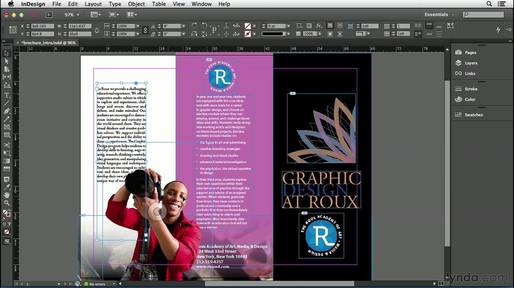
PictureAn example of what you can do in Adobe In Design. From: http://getintopc.com/softwares/graphic-design/adobe-indesign-cc-9-2-free-download/

This past week was exciting yet overwhelming at the same time. On Tuesday, Croom told us step by step how to recreate a design using Adobe In Design. We had a crash course in everything Adobe In Design in the span of a single class. Adobe In Design was confusing, to say the least, and the last time I ever used an Adobe Program was middle school. It was a reawakening for sure, but I really enjoyed it. There were so many tools to pick from, and I forgot I had to keep choosing the selector tool after finishing with a particular tool, so I was a little slow at the start. I was a deer in headlights for the majority of the class, but all in all my finished design looked pretty similar to what I was supposed to be mimicking. I left class feeling proud of myself for pushing through but mentally I was exhausted and relieved that was my last class of the day. 

On Thursday I came back hoping the day would be a little easier. Thankfully, it was and on the agenda for the day was to learn to work with columns in Adobe In Design. Croom showed us on the big screen how columns worked and how to create a layout for a newsletter or something similar to that. Then for the remainder of class, I was supposed to mimic a newsletter design given to me. There was a guide to what type of font to use and what size font but the rest was up to us. Thursday went by much smoother since I had finally begun to grasp how to use the Adobe program. Within 30 minutes my design was coming together and looking like it belonged with the rest of the newsletter. I had a few hiccups with how to properly align everything, but by the end of class, I finally started feeling comfortable with Adobe In Design. Croom instructed us at the end of class with some homework for the upcoming weekend. First, find a brand or company and do some research on it. Second, create a Pinterest board for competitor analysis and then a mood board for the brand/company. This information is going to be used for our first ever solo design project, creating a business card. I am excited to jump in next week on my own and see if I can create a business card worth using!
Till next week, 
Amanda 


Picture
A photo of me from middle school to help you understand how long ago I used Adobe until this past week. (lol)

Writing Well

Posted by & filed under Uncategorized.

It’s pretty safe to say that most people think they understand the English language and its nuances. We all passed Language Arts in elementary school. We all passed that evil, eighth grade English class. We all passed senior year English literature. We learned how to write properly during that time frame, right? Hopefully. Did all of those writing tips stick around afterwards? Debatable.There are a few grammar necessities that may have been left along the way: writing with clarity, reducing

Down to the Nitty Gritty

Posted by & filed under Blog Post.

Week 3     This week in class we jumped on the computers and dove into InDesign. On Tuesday we created a cover letter for an annual report. Each step is crucial to making the final piece. I never noticed[…]

Writing effectively

Posted by & filed under JMC 3343-002.

Writing with clarity means that the meaning of the sentence is clear to the reader and there is no confusion and the sentence is arranged logically.
Bad: She drove back to Tulsa in her car from Norman.
Good: She drove back to Tulsa from Norman in her car. 
Reducing clutter means there are no unnecessary words or phrases in the sentences. 
Bad: All four of the students turned in their papers late.
Good: All of the students turned in their papers late.
Sentence variety means the sentence isn’t monotonous and using a variety of sentence structure. 
Bad: Dr. Thompson will sit on the board of directors for American Airlines. The professor is a former American Airlines employee.
Good: Dr. Thompson, a former American Airlines employee, will sit on the company’s board of directors. 
Sentence emphasis means stressing certain words or phrases based on the importance of them.
Bad: Attorney General Michael Thompson said the serial killer was apprehended after a long police chase Tuesday night.
Good: The serial killer was apprehended after a police chase Tuesday night, the attorney general said. 

Shoutout to Middle School Yearbook!

Posted by & filed under Uncategorized.

This week in my PR Publications class, I had a striking revelation: I am not good with Photoshop. I don’t know why I thought that all the “experience” and “expertise” I had gained from working with Adobe software in middle school yearbook would benefit me whatsoever in a college course, but its safe to say […]

Effective Writing

Posted by & filed under Uncategorized.

Greetings, earthlings! This post will help out some of my fellow PR majors with some important fundamentals we face when writing. Writing with Clarity Poor: Bobby cooked a meal for the cat of shrimp. Better: Bobby cooked a meal of shrimp for the cat. Reducing Clutter Poor: All of the invited guests sat down at […]

follow the leader

Posted by & filed under JMC 3343-002.

Adobe InDesign. What a simple name for such a complicated program. InDesign is undoubtedly useful for web designers, but certainly difficult for beginners. From figuring out how to change the background color, to realizing a window and frame aren’t th…

Writing Effectively

Posted by & filed under JMC 3343-002.

Writing with Clarity

Poor: The ring was found upon a counter with a diamond missing. 

Better: The ring with a diamond missing was found upon the counter.

​Reducing Clutter

Poor: Nobody in the entire class knew how to do simple algebra.

Better: No one in the class knew how to do algebra.

Sentence variety

Poor: The teacher was very lonely. She had no friends.

Better:  Since, the teacher had no friends she was lonely.

Sentence emphasis 

Poor: Rosie Farley spoke to 1,000 students and gave the valedictorian speech at graduation.

Better: At graduation, Rosie Farley gave the valedictorian speech. 

Dive (In) to (Design)

Posted by & filed under JMC 3343-002.

PictureThe Adobe InDesign logo. (Image from LogoGulf)

This week we learned the basics of using Adobe InDesign. On Tuesday, we mimicked Croom’s actions as we created an annual report cover. Croom walked us through the steps and we did our best to keep up. I’m not going to lie, this was an overwhelming class period. Every student had about 30 questions (including myself), but by the end, the room was silent as we became more confident in our abilities. Also, my version looked very similar to the original when I finished up. So, yay!

On Thursday, we learned how to create columns (or, newspaper style documents) with InDesign. Croom showed us the basics of column design at the beginning of class and then we were assigned to copy a preexisting document on our own.

Croom advised us that the best way to begin a layout is to first create placeholders for the content – which can include headlines, subtitles, bylines, photos, captions and more. After you figure out where the placeholders work best, you can fill in your content. 

I have caught on to the basics of InDesign faster than I anticipated. I thought Photoshop had my heart, but the tables might be turning!


Picture
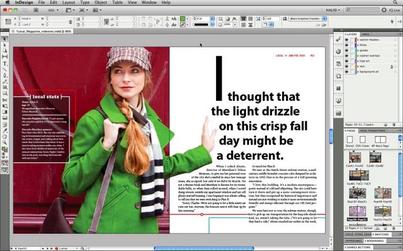
This screenshot of an InDesign project is a good example of how column design can be utilized to create a brochure. (Image from YouTube)

Writing Effectively, Unit 2.1

Posted by & filed under Uncategorized.

Photo: PexelIn this unit of Public Relations Writing, we learned about writing effectively. There are four ways to clean up our writing: – Writing with clarity: making sure our sentences have a word order that doesn’t create confusion or ambiguity…