

Canva Design Sprint!
Hello again!
This week in my Public Relations Publications class we were asked to dive into the Canva application: a web program that offers a user-friendly, somewhat intuitive workspace for design projects. We were asked to design four different social media designs: a Facebook cover photo, a Twitter header, a Facebook post and an Instagram post. For my organization/company, I chose again to design for Oklahoma Festival Ballet, the ballet performing company of the OU School of Dance. I tried to focus my designs around our upcoming performances, with the exception of the Facebook post.
So, here’s what I did!
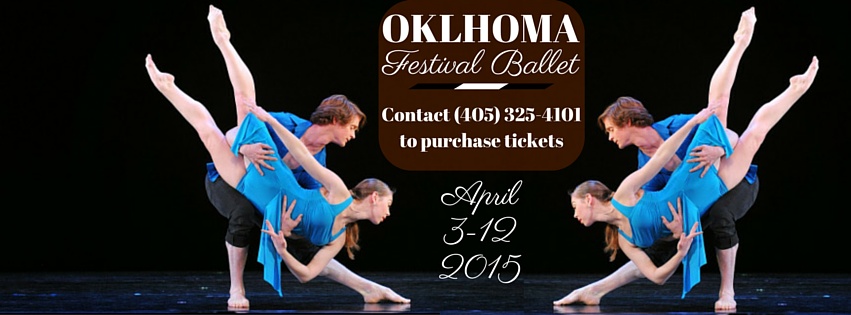
Here we have the Facebook cover photo. In Canva, the fact that the dimensions are pre-prepared was so helpful! Especially the fact that when you are designing it gives you the area that will be covered by the profile picture. It was really easy to manipulate/arrange/duplicate the photo I chose. In terms of text, it was a bit more challenging. The limited font choices was tough to be able to determine what I really wanted. Also, there isn’t a preview ability in Canva, so changing fonts can become a bit of a hassle.

In the Instagram post, I took advantage of a preset layout that Canva offered as an inspiration for my design. The original layout included all of the same elements of text design, but in different orders and in different spacing. I felt that with Instagram, the better the image, the more audience retention you will have. That is why I went very minimalistic with the text; I felt that if I could engage viewers in the image itself, then they would be more likely to read the caption where I could put more information.

The Twitter cover photo was interesting. I don’t feel like the preset dimension should be followed in this case – while it certainly fits the desktop version of twitter; I don’t feel like such a narrow image would look accurate on the mobile version, which is much more widely used. However, I went ahead and designed the header as if the dimensions were accurate. I manually added a drop shadow to the words “Oklahoma Festival Ballet” to give it some depth and dimension. This was more challenging than it is in Photoshop or other programs because I had to create a separate block of text, darken the shade of the color, reduce the opacity and offset the text. Especially as I further edited the design of the piece, I had to change multiple settings and features of the text and the text shadow. It was a lot of work that is simply solved with one button in Photoshop!

Finally, the Facebook post! This was the one opportunity I took to express a bit more creativity and really draw my audience into the picture. I utilized some of the design concepts and principles that I learned in the Canva tutorials and in the “7 Social Media Design Ideas for PR Pros” that we read this week in class.
So, there you have it! But wait, that’s not all! I started designing this week before I read the prompts exactly, so I have a treat! Here’s a poster that I designed this week as well! I used Canva for this, and while the resolution of the original image wasn’t the greatest, I got a good design out of it!

Now, in reflection:
1. How did you respond to what you were asked to do?
This week was fun! I really liked the assignment, as well as working in Canva! The only downfall is that I won’t be able to pitch my designs to the School of Dance because if they were going to use these pieces, they would’ve needed them a few weeks ago because of the time-sensitiveness of my designs.
2. How did react to what you actually did?
I felt that I did a good job. I do feel that my design are quite rigid/mathematic/architectural, but they are visually attractive.
3. What are some of the affordances that an app like Canva brings? What are its limitations?
I loved the layout presets and the dimension presets for certain materials. It was very easy to draw inspiration from the stock layouts that Canva offered. In terms of drawbacks, the biggest was the tediousness of editing designs. I love that in Photoshop you can isolate layers and view them independent of the whole design, and that was missing in Canva. I think that Canva is a great “plug and chug” machine that allows you to drag and drop images and text into a document and make decent work.
Until next time!


Comments