

Designing a Newsletter
For this assignment I was asked to choose a fortune 500 company and begin to create a newsletter for that company. In this phase of the assignment I was supposed to focus on making several different page design layouts for my newsletter. Working with shapes, fonts, colors, proximity and alignment of all the objects helped me figure out how to create a piece I envision. I was also asked to begin to gather images, photos and stories about the company so that in the next phase of design I could implement my design with the company’s news stories.
I felt challenged by the assignment, because I couldn’t figure out how I would implement creativity into a newsletter designed for a company I didn’t work for. Newsletters are such different pieces from what we’ve been designing in class, because for a newsletter the stories and pictures are available for us and we’re just learning how to create a template to place those elements within that follows the theme of the company and is appealing to the reader.
The process of designing several different layouts for the newsletter definitely took time working through different tools on InDesign, as well as refreshing myself on the elements required within a newsletter. I enjoyed sifting through different photos and news stories through the Nike website. I tried to find different stories that were of various lengths, with pictures that come with those stories. I tried to visualize the types of stories that would be important to include and how those stories would flow together.
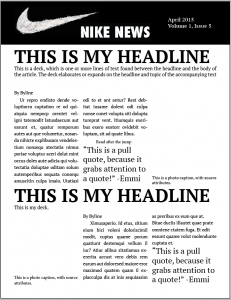
After I spent time designing dummy layouts for the newsletter, I was pleased what I was able to design. I spent the most time going back over each layout I had completed and fixing the small areas that were not spaced correctly, wanting to really have that proximity and alignment in my layout. The following are images of my dummy layout, with four separate pages of a newsletter. I imagine my first three pages to have content related to the product’s new releases, stories about the public’s use of the product and stories about the design of the product. The fourth page I separated as a single photo and article because I want to highlight a specific story about an athlete who uses Nike and describes its advantages, with a single photo of the individual wearing the product.


I believe there are many benefits to creating the dummy before getting started with the newsletter content. I think if we don’t step back and look at the whole picture of something, arranging its parts is very difficult. When you have a layout, the content will fit together much better because you have an idea of how to merge it into one design. The layout tells me what size of images and photos I’m looking for, and a good layout makes the information enjoyable to read as you gloss over the creative appeal of the newsletter. Now I’ll be able to eliminate some of the content I find that wouldn’t flow well in the newsletter design I’ve created. I imagine designing the dummy is important just as a picture of a sculpture is to a sculptor. If the sculptor doesn’t know know what his or her sculpture is supposed to look like in the end, he or she will have countless trial and error sessions until the product finally looks right. However, if he or she has already sketched or found a piece to design, the process will merely be using the elements to replicate the picture/image. I think the dummy process of design is vital for completing it efficiently.


Comments