

Designing a Newsletter
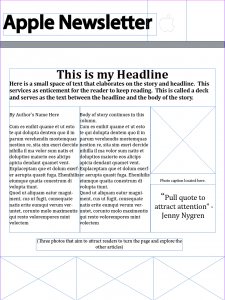
Our task this week was to design a newsletter for a Fortune 500 company. We were back to using InDesign and I can’t believe how easily I got the functions confused with Photoshop. It took a while but I got into the swing of things. Below is a dummy layout for my Apple newsletter. This shows where everything will go once I incorporate the articles. 

I was excited for this assignment because in other classes I have created newsletters but used other programs like Microsoft Word. So I feel like this assignment will teach me another way to create a newsletter with a program like InDesign.
When I started this assignment I was a bit disappointed in myself at the beginning. I was having a difficult time remembering how to work InDesign since it’s been a couple of weeks since we have used it. But in the end, I had to start from scratch and rewatch some of the videos. Hopefully next time I won’t forget the most basic functions.
I was disappointed that I forgot how to work InDesign. But I feel that since I did forget, I should have an easier time remembering the next time I work with InDesign.
There are many benefits when using a dummy layout for a newsletter. I worked with the entire newsletter in mind instead of just each article at a time. I feel like I also have a slight advantage because Apple produces a lot of news, so there is quite a variety of articles that could fit into my predetermined layout!


Comments