

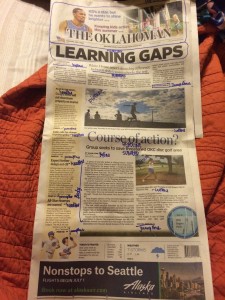
Newspaper markup
This week, we began with watching 3 billion videos over Photoshop and InDesign. Although, I say that really dramatically. It actually wasn’t too bad. It was a really neat way to learn in an interactive way. After I completed watching the videos, I had learned how to manipulate pictures and text in Photoshop. I also brushed up on my InDesign skills by learning how to work with master pages and tabs. For our first assignment out of lesson 1.3, we marked up a newspaper and identified the various design aspects within the front page. Some of the design aspects that are default for almost every front page are headlines, subheads, jump lines, bylines, cut lines, and pull quotes. Below is a picture of my marked up newspaper. As you can see, different fonts and colors make different parts of the paper stick out. For example, the main headline is in a really bold and large font. Newspaper designers do this because they have decided that this is the most important story they want to feature that issue. Analyze the paper and see what other design techniques stand out to you!


Comments