

REFLECTION
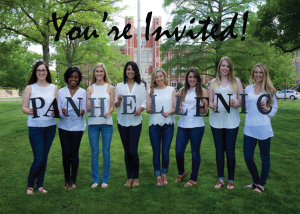
This week, we were asked to use Photoshop in order to create our direct mailer project/draft. I have found this process to be somewhat difficult because of my lack of knowledge in Photoshop. After watching some of the helpful tutorials, I created two different drafts. As of now, I like my second draft better. I like this draft better because it is more attention grabbing and reflects the personalities of my stakeholders better. Although I think it still needs some more work… I like the direction where my draft is headed so far!
1. How has your first stakeholder help define your second stakeholder?
My first stakeholder (potential new PanHellenic members) helped me define my second stakeholder by asking myself “who has the most influence on these potential new members?” After asking myself this question, “PanHellenic Alumni” or mothers came to my mind very first. I believe my second stakeholder has major influence on my first stakeholder and can easily persuade their decisions regarding Greek life in college (especially at the University of Oklahoma).
2. Has your design changed since the last draft? What influenced the changes?
Yes, my design was first centered around the University itself in order to draw members to OU first (and then to the Greek system second). After analyzing my stakeholder, I decided that I should make my design more “girly” and appealing to the eye. In my second draft I went with a more fun/summer approach since the girls go through recruitment during this season.
3. What similarities and differences have you found between Photoshop and InDesign?
I have found that Photoshop is much more confusing for me to work. I think that the layers make working in Photoshop more difficult. Many of the tools are similar in both programs, but they are located in different spots. After working with both, I enjoy InDesign much better! For me, InDesign is much easier and straight-forward than Photoshop.
A few examples of my first/second drafts are shown below:


Comments