

Reflection
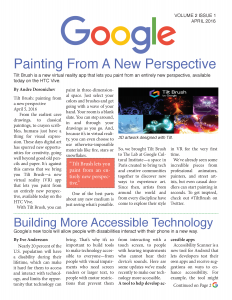
In my public relations publications class we were asked to pick a Fortune 500 company to design a newsletter for. We had to make it at least three pages with four stories. We used InDesign to help us create the newsletter.
I wasn’t worried at all when I first saw what the assignment was. Sure, there were a lot of small components but I felt comfortable with InDesign and thought this was going to be smooth sailing. WRONG. As soon as I started creating the layout, I realized I was in for a long ride. It took a lot of time to just get the template ready and make sure every photo fit and then make it look presentable. I was a bit stressed out about the outcome of my design, simply because I didn’t know if I had the ability to pay attention to detail and spend so much time on stuff as easy as arranging a picture.
I think I was freaked out at the beginning because something that I thought was really easy to use takes a lot more time when designing something with so much detail. I would spend thirty minutes on a part and then later realize that it was not how I wanted it to be. I wasn’t expecting spending so much time on it, but I think the outcome was very well worth it.
My audience was the internal public, which is why I decided to use blogs from people that work at Google. I believe that working at such a big company sometimes things go unnoticed. So designing for people that actually work at Google allowed be to create a simple yet playful newsletter. The content in the blogs are very informational and I think by adding color without making it look like kindergarten, was my biggest conflict. I wanted it to look appealing without going overboard, and I think the balance with the content and colors allowed me to do so.
I am very happy with my end product despite spending hours on aligning text boxes!


Comments