

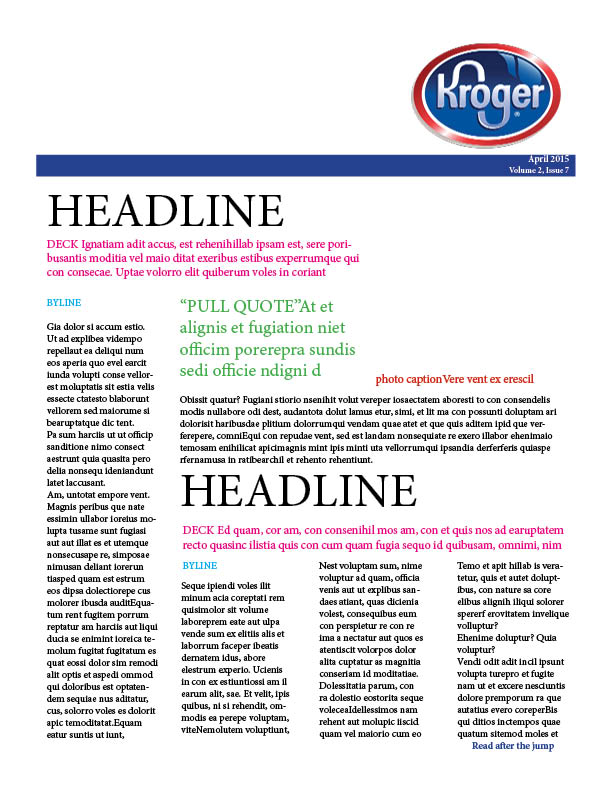
The beginning of a newsletter
“Dummy Layouts”


For PR Publications, we were asked to build the “skeleton” of a potential newsletter for a Fortune 500 company. I chose Kroger as my company.
In this newsletter, the following items were required:
One nameplate
Headlines (for every article)
Deck (for every article)
Bylines (for every article)
Photos (one per article)
Caption (one per photo)
At least one pull quote
At least one jump article
At least one article must have subheads
After reading the requirements, I began to construct the newsletter. At first, this was a little overwhelming…

Once I utilized the D2L examples and found my company, I was excited to get to work on something that is very applicable to public relations. I soon realized that designing newsletters isn’t too difficult but placing the content gets tricky. InDesign is easier for me to navigate opposed to Photoshop, so I was happy to get back to the software.
Overall, I am proud of my “skeleton” newsletter! I am not sure if it contains too much content though? The layout is eye appealing I think and the blue line ties in the Kroger color scheme.
My positive reaction is probably due to the fact this is the first newsletter I have designed, so there isn’t much to compare it to. I used the examples provided on D2L to get a clue into how to format the newsletter.
I think it will be beneficial having a dummy layout to utilize when adding real content. The dummy format gives structure to the newsletter and provides a visual “mock-up”. Now, I just need to put in the content in place and make adjustments. Easy enough right?


Comments