

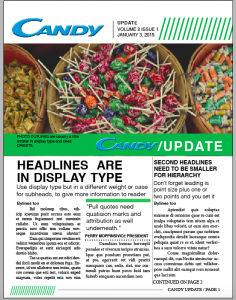
Typesetting Assignment
“Today we will be working with Adobe InDesign class,” said Adam Croom. “Wait, In-de-what?” I thought to myself. I barley know how to use the basic functions of my MacBook, let alone venture into a new software program. I immediately started to stress before there was even stress to stress about.
As a class we were asked to recreate only the textual portion of the front page of a newsletter. Croom provided us with an InDesign document that already had the images and logos in place. Our job was to place headlines, subheads, bylines, body text, photo cutlines, pull quotes, dividers and a jump line using the correct format. The font mainly consisted of Helvetica, bold or light, with font and leading sizes ranging from 33 pt. to 10 pt.
When I was recreating my text boxes, I found that working with the “grid option” on made visualizing my spacing much easier. Also, being able to take the grid option off by pressing the “W” on my keyboard gave me a clear view of how well I was able to recreate the section I was working on. Once all my text boxes were created I noticed I needed to reposition certain sections of my newsletter for overall spacing purposes.
I felt confident in my ability to recreate the textual portion of the front page of a newsletter once I finished the assignment. Thankfully, with the help of Lynda.com, I was able to learn a few navigation skills within Adobe Indesign. In the end, I realized I was stressing over stress that didn’t need to be stressed about.
I survived. Here’s to tackling my next assignment using Adobe InDesign.


Comments